
Stop building slides from scratch. Start editing. We dive deep into Agent Mode, security protocols, and the ROI of AI-driven presentations to answer the $30/month question.
Imagine saving 4 hours on every presentation deck your team creates. Now, imagine doing that without your proprietary financial data ever leaving your secure tenant.
In 2024, Microsoft Copilot was a promising experiment filled with friction. In 2026, with the launch of Agent Mode and Organizational Asset Libraries, it has matured into a serious enterprise contender.
But is it ready to replace your professional design agency? Not quite. Here is the honest, deep-dive analysis of where Copilot shines in PowerPoint and where it still needs a human pilot.
From Blank Page to Boardroom Draft in Minutes
The “blank page syndrome” is the biggest killer of corporate productivity. Copilot’s ability to transform a 20-page Word strategy document into a 15-slide deck is not just a feature; it’s a workflow revolution. With the new Narrative Builder, you don’t just get random slides—you get a structured story.
- Key Stat: Early enterprise adopters report a 75% reduction in time-to-first-draft. This isn’t about laziness; it’s about reallocating time from formatting boxes to refining strategy.
The Game Changer: Agent Mode
Until late 2025, AI was a “fire and forget” missile. You prompted, crossed your fingers, and hoped for the best.
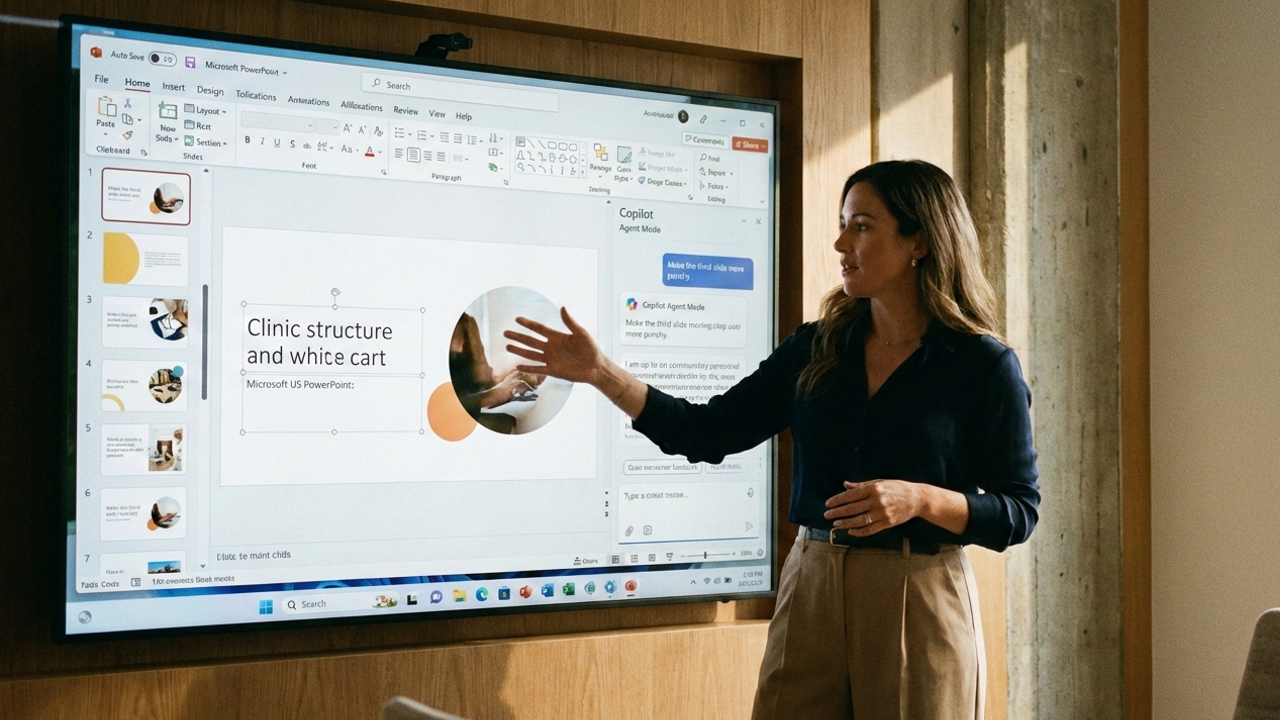
The January 2026 release of Agent Mode changes this paradigm entirely. You can now iterate conversationally:
“Make the third slide more punchy,” “Use the blue brand color for the charts,” or “Rewrite this bullet point to sound more confident.” This granular control is what enterprises have been waiting for.
Your Data Stays Yours
Unlike niche AI tools like Gamma or Beautiful.ai that might require moving data to external servers, Copilot is built on Enterprise Data Protection (EDP).
It inherits your Microsoft 365 security labels. If a source file is marked “Confidential,” the AI treats the resulting presentation as such. For the C-Suite and IT Security teams, this peace of mind is worth the license cost alone.
Let’s be clear: Copilot is not a designer.
It struggles with complex, custom templates and intricate data visualization nuances. It can hallucinate details if not strictly grounded.
- The Verdict: If you need a “Steve Jobs” style keynote for an IPO roadshow, hire a human agency. If you need a quarterly business review update by 5 PM today, use Copilot.
Microsoft Copilot in PowerPoint is enterprise-ready for knowledge workers, if not yet for visual designers. The organizations that win in 2026 will be the ones that train their teams not just to use the tool, but to think like editors and strategists, letting the AI handle the heavy lifting of assembly.
Call to Action: Ready to deploy Copilot effectively? Don’t just buy licenses—build a strategy. Download our “2026 Copilot Adoption Roadmap” to ensure your team moves past the hype and into high-performance.